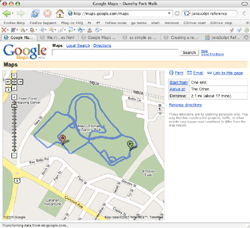
Stayed up way to late, but it was worth it. I've managed to load my own GPS trails onto the Google Maps interface. Moo haaa haaa...
Click on the screen cap for a larger version and eventually details...
 |
Fri, 11 Feb 2005
All your Google Maps belong to us
Stayed up way to late, but it was worth it. I've managed to load my own GPS trails onto the Google Maps interface. Moo haaa haaa... Click on the screen cap for a larger version and eventually details...
GDrive: Driving Google Maps
Here's an updated set of bookmarklets to "drive" the Google Maps driving directions. Just follow these steps:
And more info can be found here on Google Maps Hacking and Bookmarklets
Update: Added the walking man icon from the above link and pegged the
speed at the current zoom level.
Google Maps
Holy cool. If you haven't seen this already, go check out Google Maps. It's still in beta, but already provides a seriously nice interface (maps as big as your screen, smooth scrolling, turn-by-turn details on directions, keyboard short-cuts, do-what-I-mean searchs, and more). On top of that there are many opportunities for playing with the data. A good collection of how-it-works details can be found onas simple as possible, but no simpler. So far, I've written Python scripts to pull down titles based on lat/lon/zoom, download driving directions and then parse out the route to upload to my GPS. And check out these little bookmarklets found in the comments of the link above: follow route or follow fast (only tested on OS X Firefox. To use, drag to your tool bar then click on one while looking at a directions map zoomed way in. No way to cancel before the end yet) So many things to play with!
Update: Modified the bookmarklet so that the starting marker now
moves along with the route: follow route w/marker (starting to drag down my poor little Mac's CPU. probably will work much better on a younger-than-3-year-old computer) |
currently reading
on deck
on the coffee table
recently read
gnik merchandise
|




 {if (!_m.map.me) {_m.map.me = _m.map.createLocationMarker("http://libgmail.sourceforge.net/man.png", N.get("local"));}; mv = function() { i=_m.gdir_i; _m.gdir_i=Math.min(_m.gdir_i+_m.map.zoomLevel,_m.map.directions.polyline.numPoints-1); c = _m.map.directions.polyline.getPoint(i);_m.map.recenterOrPanToLatLng(c); _m.map.setMarkerPosition(_m.map.me, N.get("local"), c); if (_m.gdir_stop!=1 && i < _m.map.directions.polyline.numPoints - 1) {window.setTimeout("mv()",500)}else{_m.map.me.hide()}};_m.map.me.show();if(!_m.gdir_stop){_m.gdir_i=0;} _m.gdir_stop=0; mv()})();)